


PREMIER Credit Card
4.616.37K Reviews
App Specs
- Version
- 3.19.5
- Updated On
- License
- Free
- Downloads
- 1,000,000+
- Developer
- PREMIER Bankcard
- Categories
- Finance
- Platform
- Android, iOS
Screenshots
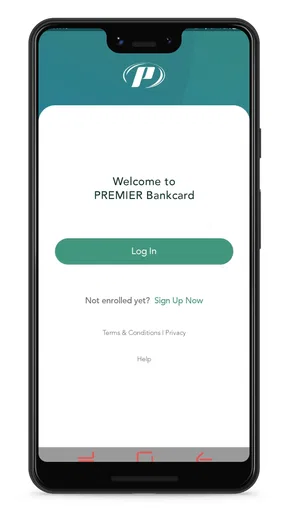
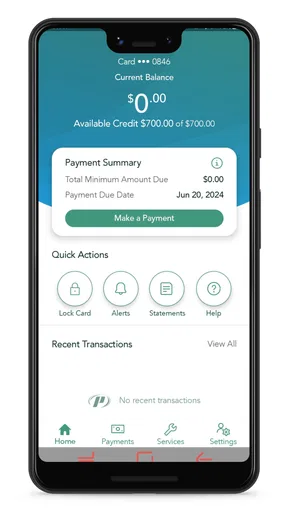
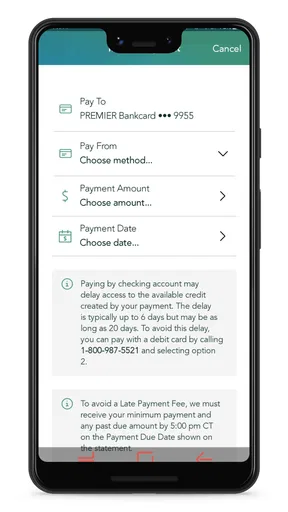
 Analysis by AppCompare
Managing a credit card is rarely exciting, but it can become much easier when the basic tasks are gathered in one dependable place. I spent time using PREMIER Credit Card as a finance app for handling a PREMIER Bankcard account, and my impression is straightforward: it is built for routine control rather than entertainment or financial education. That focus is its main strength. You open it to check what is happening, make a payment, review activity, or keep an eye on the account, then get on with your day.
The app is free, aimed at Everyone, and developed by PREMIER Bankcard. Its role is narrow enough that expectations matter. This is not a general budgeting tool, an investing platform, or a replacement for a full banking app. It is most useful when your main financial task is staying on top of a PREMIER credit card without relying on a desktop browser or waiting for paper information.
What stays useful after the first week
I find the lasting value here less about discovering new tools and more about deciding when a quick account check fits naturally into my day. Pairing that check with an existing routine—such as reviewing purchases after errands—can make it easier to notice questions while the details are still fresh. That habit also brings the next consideration into focus: how comfortably the app’s screens and navigation work for different users.
The first-week appeal is practical, not flashy
During the first few days, the attraction is the reduction in small bits of friction. Instead of searching for account paperwork or opening a browser, I can go directly to the card-management experience on my phone. That matters when I am checking whether a payment has gone through, looking at recent activity, or trying to understand how much room remains before making another purchase.
The strongest early habit is opening the app before spending. A quick account check can prevent the familiar mistake of assuming a payment or credit adjustment has already appeared. I would not treat the displayed balance as a substitute for reading transaction details, but having the account available at the moment I need it makes responsible checking more realistic than relying on memory.
Another useful first-week routine is separating three questions that people often mix together: what I owe, what has recently posted, and what I can safely spend. The app helps make those checks part of one visit. That does not turn it into a budgeting system, but it can support a simple personal rule: check activity first, decide on a purchase second, and leave repayment planning for a separate moment.
PREMIER Bankcard has kept the product focused on its own card relationship. That is convenient if this is the account I need to manage, because I am not sorting through unrelated checking, savings, loan, or investment screens. The trade-off is equally clear: people looking for a complete view of their household finances will quickly reach the app’s boundaries.
Worth Reading Before You Choose

EA SPORTS FC Mobile 26 Is a Bigger Football Game, but It Takes Time

Flipboard Shows What News Apps Must Do Beyond the Feed

Switching to Android Auto Means Rethinking Your Driving Routine

Google Calendar Makes a Crowded Week Easier to Manage

Ludo King Makes the Most of the Minutes Between Plans

Baby Panda World Brings Quick Play to Modern Phones, but Its Game Library Feels Busy
A realistic everyday use case
Imagine I am at a grocery store and remember that an earlier payment may still be processing. I can open the app, inspect the account, and make a more informed decision before completing the purchase. Later that evening, I can review the activity again and compare it with my receipt. This is a modest workflow, but it is exactly the kind of repeated action that gives a finance app lasting value.
I also find the app more useful before a payment deadline than after it. A short check several days ahead gives me time to confirm the amount, choose the payment action that fits my plan, and avoid treating the due date as a surprise. The important insight is that the app works best as a reminder for a habit I already choose to follow; it cannot create the habit for me.
Who will understand the app quickly
Existing PREMIER Bankcard customers are the natural audience. If you want a direct mobile way to manage that card and do not need a wide collection of financial tools, the narrow scope feels sensible. The app has earned a 4.6 average from around 252 thousand ratings, with more than a million installs, which suggests that many people find this focused approach useful in everyday account management.
New cardholders may also appreciate having a dedicated place to become familiar with their account. I would still spend time learning the difference between a current balance, a pending item, and a statement amount rather than assuming every number means the same thing. That distinction is more important than the app’s appearance, because a polished screen cannot prevent a payment mistake caused by misunderstanding account timing.
Where it differs from usual finance alternatives
Compared with a general banking app, this one is less suitable for moving money between multiple accounts or reviewing an entire financial life. A bank app usually wins when I need checking-account transfers, deposit tools, or a combined view of several products. A budgeting app wins when the goal is assigning spending to categories, tracking household trends, or comparing income with recurring bills.
Compared with a mobile browser, the dedicated app is more convenient for repeated access. I do not have to begin with a web search or navigate through a broader site every time I want to inspect the card. The browser may still be preferable on a shared computer, on a phone where I avoid installing finance apps, or when I want to manage several unrelated financial services in one session.
That comparison explains the app’s lasting appeal. It does not need to replace every financial tool. It only needs to make PREMIER card tasks easy enough that I actually perform them regularly. For that purpose, specialization is more valuable than a long feature list.
What the app does not solve for me
The app can put account information and management actions within reach, but it does not automatically tell me whether my overall spending is healthy. I still need a separate method for planning bills, building savings, or deciding whether a purchase belongs in my monthly budget. Someone expecting personalized financial coaching may find the experience too functional.
I would also avoid using it as my only record of important financial decisions. For significant purchases or repayment plans, I prefer keeping my own notes and checking statements carefully. A mobile account view is convenient, but convenience should not replace reading the details connected with a payment or transaction.
The month-to-month value comes from repetition
After the novelty fades, the app’s value depends on a small number of recurring behaviors. I would open it when a payment is due, after a cluster of purchases, and whenever I need to verify account activity. Those moments are not dramatic, yet they are exactly when a dedicated card app can prevent avoidable confusion.
The most effective routine is a three-part check. First, I look at recent activity for anything unfamiliar. Second, I compare the balance with the amount I planned to repay. Third, I confirm that the action I took is reflected as expected when I check again later. This workflow is intentionally simple, but it turns the app from a passive account window into a regular checkpoint.
One non-obvious benefit is that frequent short visits are better than occasional long sessions. Waiting until the end of a billing period makes it harder to remember purchases and easier to miss an issue. A quick review after shopping or after a payment gives me a clearer mental connection between the transaction and the account. The app supports that approach because it is available wherever I happen to be using my phone.
Version and device considerations
The current version is 3.19.5, and the app runs on Android 7.0 or later. That broad operating-system requirement makes it relevant to people who keep an older Android phone instead of upgrading frequently. I would still install updates when they are offered, especially for a finance app, because reliability and security maintenance matter more here than gaining novelty.
The age rating is Everyone, which fits the app’s financial-management purpose. That label should not be confused with financial suitability: an app can be accessible to a wide audience while the credit decisions made through the account still require adult judgment and careful planning.
Maintenance is light, but attention is still required
The app itself does not demand much maintenance beyond keeping it updated and checking the account consistently. The real maintenance burden is behavioral. I need to remember to review activity, confirm payments, and avoid assuming that opening the app once means the account is permanently under control.
For me, the best setup is attaching the check to an existing routine, such as reviewing purchases after returning home or looking at the account before planning the week’s bills. I would not rely on vague intentions like “I will check it more often.” A specific trigger makes the app more useful without turning finance management into a constant task.
There is also a privacy trade-off in using any financial app on a phone. I prefer a device protected by a strong lock and would avoid checking sensitive account information on an unfamiliar or shared device. The convenience of mobile access is worthwhile only when the phone itself is treated as part of the security routine.
Small sources of friction that can become tiring
The narrow purpose that makes the app easy to understand can also make it feel repetitive. If I want spending analysis, broader account aggregation, or long-term financial planning, I must move to another tool. That switching is not a serious problem for occasional use, but it becomes tiring for anyone hoping for one central finance dashboard.
Another possible source of fatigue is the need to interpret account information rather than merely glance at it. Seeing a number is not the same as understanding whether it includes pending activity, relates to a statement, or reflects a recent payment. Users who want a single unmistakable “safe to spend” figure may be disappointed, because credit-card management involves timing and repayment choices that require personal judgment.
I also think the app is less compelling for people who rarely use their PREMIER card. If the account is kept for emergencies and sees very little activity, a browser visit or periodic statement review may be enough. Installing a dedicated app makes more sense when regular checking, payment management, or transaction monitoring is part of your normal routine.
When a different option is better
I would choose a broader banking app when my priority is viewing a checking account beside the card or moving money between several financial products. I would choose a budgeting app when I need categories, shared household planning, or a clear month-by-month spending picture. I would choose a browser when I do not want financial apps on my phone or when I am already managing several accounts from a computer.
That does not make PREMIER Credit Card a weak choice. It means the right decision depends on the job. For a PREMIER Bankcard customer who wants direct card access, the dedicated app is more focused than those alternatives. For someone seeking a complete financial command center, that focus becomes a limitation rather than an advantage.
How I would use it without creating extra work
I would begin by making one careful visit to understand the account layout, then establish two recurring checks: one after a payment and one during regular spending review. I would inspect unfamiliar activity promptly instead of waiting for the end of the month. I would also keep a simple outside note for planned repayments, because the app should support my plan rather than become the plan itself.
For a new user, I would avoid testing the app with a rushed payment at the last possible moment. It is better to learn the available account information and payment flow when there is no deadline pressure. That approach reduces the chance of confusing a confirmation screen with a completed financial outcome.
I would also resist opening the app only when I am worried. If every visit happens after overspending or a missed reminder, the experience becomes associated with stress. Short, neutral checks make it easier to notice ordinary activity and address small questions before they become urgent.
My long-term verdict
After the first-week appeal wears off, PREMIER Credit Card earns its place through dependable repetition rather than discovery. It is a practical companion for PREMIER Bankcard customers who want mobile access to the account and are willing to maintain a simple checking habit. The free price removes an obvious barrier, and the focused design is easier to justify than a large finance suite when card management is the only task I need.
My recommendation is strongest for someone who regularly checks purchases, monitors payments, and wants a dedicated alternative to using a browser. I would be more cautious for anyone searching for budgeting guidance, multi-bank aggregation, or a complete personal-finance overview. In those cases, another tool should sit beside this app or replace it.
The lasting value is therefore conditional but real: its best feature is making responsible account checking convenient enough to repeat. It will not manage my money for me, and it cannot remove the need to understand credit-card timing. Used with that expectation, it remains a sensible, low-maintenance finance app rather than a novelty that disappears after installation.
Pros
- Easy access to account details
- payments
- and transaction history in one place.
- Payment reminders can help reduce the risk of missing a monthly due date.
- Useful credit-building option for applicants with limited or damaged credit.
- Card controls make it easier to monitor spending and spot unfamiliar activity.
- Digital statements reduce paper clutter and simplify record keeping.
Cons
- High fees may significantly reduce the value of rewards or available credit.
- Interest charges can become expensive when balances are carried month to month.
- Credit limits may start low
- restricting larger purchases and flexibility.
- Approval and account features can vary based on individual creditworthiness.
- Customer support or issue resolution may not always be immediate.
FAQs for PREMIER Credit Card
What is the PREMIER Credit Card app used for?
The PREMIER Credit Card app is designed to help cardholders manage their account from an Android or iOS device. After signing in, you can generally review your balance, available credit, recent transactions, payment due date, minimum payment, and account details. It is most useful for everyday monitoring, although the exact tools available may depend on your card type, account status, and the current version of the app.
Can I make a payment through the PREMIER Credit Card app?
Yes, the app is intended to make account payments more convenient for eligible cardholders. You may be able to submit a one-time payment, review scheduled payments, and check whether a previous payment has been processed. Before confirming anything, carefully verify the linked bank account, payment amount, and due date. Payment posting times can vary, so avoid waiting until the last moment to prevent possible late-payment issues.
Is the PREMIER Credit Card app safe to use?
The official PREMIER Credit Card app should be downloaded only from the Google Play Store or Apple App Store, using the verified publisher information. Account access normally requires your login credentials and may include additional security checks. Even so, users should keep their phone and operating system updated, avoid entering information through links in suspicious messages, use a strong password, and contact PREMIER directly if unusual activity appears.
What should I do if I cannot log in to my PREMIER Credit Card account?
If you cannot sign in, first check that your username, password, and internet connection are correct. Use the app’s password or username recovery options rather than repeatedly guessing your credentials, since multiple failed attempts may temporarily restrict access. If the problem continues after updating the app or restarting your device, contact official PREMIER customer support through a trusted statement, website, or app channel.
Are there fees for using the PREMIER Credit Card app?
Downloading and using the official app is generally separate from the fees associated with your PREMIER credit card account. However, your card may have annual, maintenance, payment, cash-advance, or other charges described in the cardholder agreement. Your mobile carrier could also apply data charges, particularly when using mobile data. Review the account terms and payment screens carefully so app convenience does not lead to unexpected costs.


